



Reservation management
Run the day from one calendar.
Stays, changes, payments and invoices in one place, included in the subscription.

Why one calendar
A shifted stay: four fixes, or one move
With separate tools
- Fix the spreadsheet
- Fix each platform, one by one
- Collect the balance, later
- Redo the invoice by hand
With Reservit
1 move
The stay slides in the calendar: rate, balance and availability follow.
The calendar
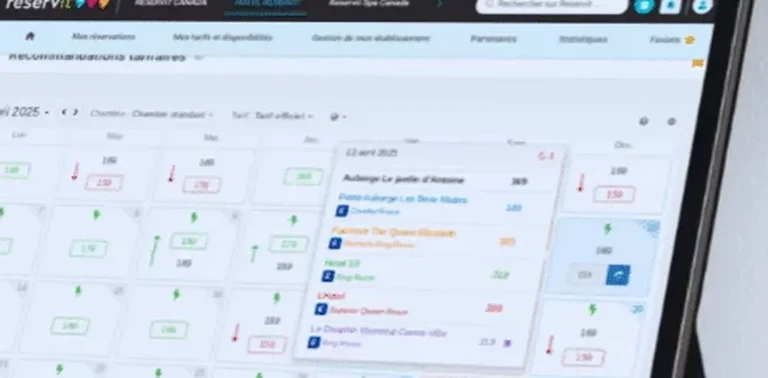
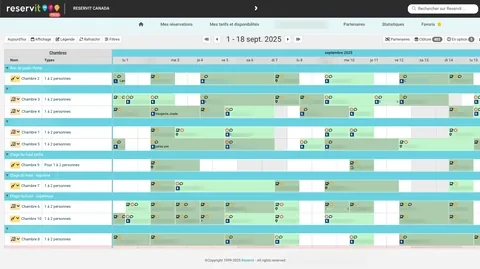
A whole week at one glance
Units down the rows, days across the columns: nothing to open to see who arrives tomorrow.
The change has been saved
Confirmation
Move this booking to the new room?
Scroll the calendar →
Day, week or month
One busy day, or the whole season.
Colour coding
Direct, platform or blocked unit: it reads without opening the record.
On your phone too
The same calendar in the mobile app.
Four steps
Change a stay without starting over
Rate, balance and availability all follow.
Select
One click on the stay in the calendar opens its record.
Edit
Change the dates or the unit: the rate recalculates.
Settle the payment
Has the balance moved? Take the difference, or issue the refund.
Save
Availability goes back out to your sales channels.
Groups and allotments
A group behaves like one stay
Conference group
12 units, 3 nights
- Unit 101Master invoice
- Unit 102Master invoice
- Unit 103Separate payment
- 9 more unitsMaster invoice
Flexible unit blocks
Twelve units in one go, then just one adjusted.
Bulk changes
A rate, an option or a meal for the whole block.
Master invoice
One invoice for the group, or separate payments.
Invoicing
Invoices start in the calendar
Invoice from the record
The document comes from the stay, without changing screen.
Send by email
The PDF goes to the guest from the same window.
Your province’s taxes
GST, HST, QST or PST, calculated for your province.
Day to day
Five ordinary tasks, before and after
| Task | With separate tools | With Reservit |
|---|---|---|
| Shift a stay by one night | Fix the spreadsheet, then each platform one by one | The stay moves, availability goes back out |
| Collect a balance | Come back to the file later, when it comes to mind | The balance settles in the same window |
| Invoice a group | One invoice per unit, added up by hand | Master invoice, or separate payments |
| Know who arrives tomorrow | Cross two lists and an inbox | The day reads on a single row |
| Prepare housekeeping | A sheet printed the evening before | Arrivals and departures come from the same calendar |
Peace of mind
The calendar of thousands of properties
0%
software commission on your reservations
35,000
properties equipped by Reservit
300+
partners available: platforms, payments, locks
1999
the year Reservit was founded
Frequently asked questions
What is Reservit reservation management?
Is reservation management included in the subscription?
Can the calendar be used from a phone?
How do I change a stay?
What does the colour coding show?
Do platform reservations show up in the calendar?
Do changes go back out to the platforms?
How do I handle a group or an allotment?
Can I invoice a whole group on a single invoice?
How is the invoice produced?
Does the software take a commission on these bookings?
Do current bookings have to be re-entered when changing software?
Does the calendar connect to my point of sale or my door locks?
Do I need to install software on our computers?
Can I manage several properties?
Reservation management: full fact sheet
The calendar The core of the software
- Units in rows, days in columns; day, week or month view.
- Drag and drop: a stay changes unit or dates.
- Colour coding: direct booking, platform or blocked unit; status confirmed, awaiting guarantee, checked in, checked out.
- The stay record opens from the calendar: contact details, services, payments, documents.
- All reservations go straight in, whatever the sales channel.
Changing a stay Four steps
- Select: one click on the stay opens its record.
- Edit: the dates or the unit change, the rate recalculates.
- Settle the payment: take the difference or issue the refund.
- Save: availability goes back out to your sales channels.
Groups and allotments A group like one stay
- Flexible unit blocks: twelve units in one go, then just one adjusted.
- Bulk changes: a rate, an option or a meal for the whole block.
- Master invoice for the group, or separate payments; selected extras on separate invoices.
Invoicing From the stay record
- Invoice generated without changing screen, PDF emailed to the guest.
- Your province’s taxes (GST, HST, QST or PST) and the lodging tax calculated.
- Accounting exports to Acomba, Sage 50 and QuickBooks.
See invoicing tools.
What changes day to day Before and after
- Shift a stay by one night: instead of the spreadsheet then each platform, the stay moves and availability goes back out.
- Collect a balance: it settles in the same window.
- Invoice a group: master invoice or separate payments, no more adding up by hand.
- Know who arrives tomorrow: the day reads on a single row.
- Prepare housekeeping: arrivals and departures come from the same calendar.
Access and security Anywhere, nothing to install
100% cloud-based: the calendar opens in a browser. The mobile app is included, with no cap on users. Multi-property management included, at no extra cost.
Going live Changing software
Guest records, companies, upcoming reservations and payments already collected are migrated from your current system; units, rates, taxes and channel connections are set up with the team. Migrating your reservation data is included in the price of the Reservit setup (going live).
Who it is for Tourist accommodation in Canada
Hotels, motels, inns, B&Bs, chalets, campgrounds and outfitters. Reservit was founded in 1999, equips 35,000 properties and has more than 300 partners available (partner catalogue).
Subscription and pricing How the price is set
- A subscription priced in Canadian dollars, taxes extra, never a percentage of your bookings: the software takes no commission.
- The price depends on the type of property, the number of units and the add-on modules you choose, never on your sales volume.
- Unlimited users: Reservit bills the software, never the user.
- Included: the ten modules of the suite, more than 50 integrations with no usage fees, updates, onboarding, training and support from a team based in Canada, by phone or by email.
- Add-on modules, only if you choose them: online check-in, guest messaging, extras and services, metasearch sites (Trivago, Tripadvisor, KAYAK…), website builder, CRM (guest records and newsletters), online reputation management, pre-arrival guest preparation, guest reviews, local listings management. The direct connection to Google is included; Google Hotel Ads advertising is optional.
- Yearly commitment, monthly or yearly payment; adding or removing units is prorated.
- A written offer, priced for your property; migration of your booking data from your previous software included in the installation price.
- Security: two-factor authentication, access logs, PCI DSS certified payment environment.
Details on the Pricing page.