



Online reputation
Your reviews are already written. What you lack is one screen
Reviews from the major platforms in one place, a drafted reply, your score tracked over time.
- One queue for every platform you track
- A reply drafted for you, never posted without you
Request a demo See the review queue

The Online reputation module is built on Qualitelis technology, integrated into Reservit.

The sources
Five platforms, one queue
Reviews come from many places. Here, they land in one.
Review queue: five platforms, with a score, an excerpt and a status on each line.
- GoogleWarm welcome, spotless room.Answered
- Booking.comGreat location, breakfast needs work.To handle
- TripAdvisorLong wait on arrival.Priority
- ExpediaGood value for money.To handle
- Hotels.comWe will definitely be back.Answered
The module
Four steps, in one place
-
1
Gather
Every tracked review, in a single queue.
-
2
Reply
A draft to check over, in the language of the review.
-
3
Measure
An overall index and one per criterion, over time.
-
4
Compare
Five competitors tracked, day after day.
1. Gather
What is still waiting, without opening five tabs

- The countersAll reviews, pending replies, negative reviews.
- One line per reviewPlatform, score, excerpt.
- The statusNot handled or done: what is left shows at a glance.
An unanswered review is the one the next guest reads.
Your priorities
Low score, key platform, long review: you set the rules.
Filters and alerts
By source, period or score, on your criteria.
2. Reply
A drafted reply, not a reply already sent
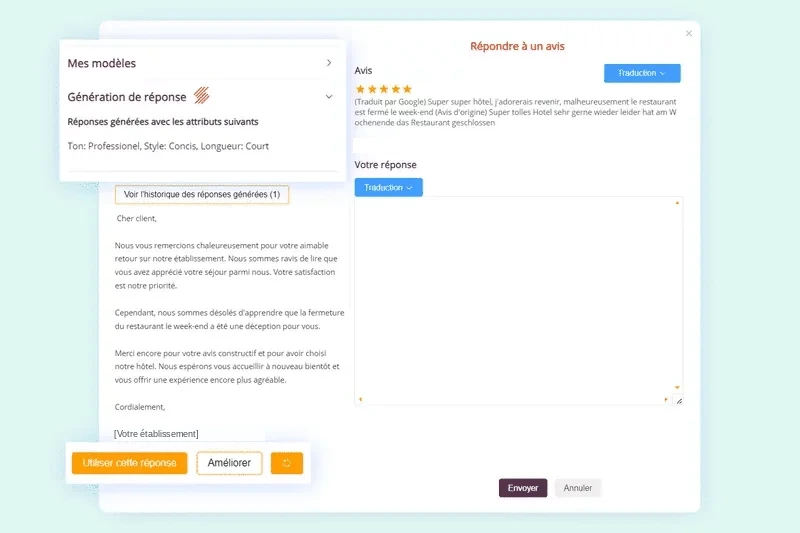
- Your toneYour templates; tone, style and length set.
- The draftWritten from what the guest said.
- TranslationTo reply in the language of the review.
- You decideUse, improve, then post.
A reply signed by your property speaks for your brand: it gets read before it goes to the platform.
3. Measure
What is not measured does not improve

- The indicatorsIndex, average, positive, negative, handling rate.
- The sourcesWhere your reviews come from, platform by platform.
- The trendThe chosen period, compared with another.
Per criterion
Cleanliness, welcome, value for money.
Reports that send themselves
To whoever needs to read them.
Several properties
An overall view of the group.
4. Compare
Your score means nothing on its own
The same 8.4 score is above a market at 8.0 and below a market at 9.0.
Same score, two markets
Comparison is what gives it a scale.

- The rankingYour rank among five competitors you choose.
- The indexOne scale for everyone.
- The platformsEach one’s score, and the gap, day after day.
Two modules, two jobs
Handle published reviews, collect your own
Online reputation
What guests write on the platforms.
Guest reviews
What you ask for after the stay, and display.
The same stays
Inside the same software.
Ready to answer your reviews from one screen?
A demo with the Montreal team, run on your own cases.
35,000 properties equipped by Reservit
Frequently asked questions
What people ask before getting started
Can a negative review be taken down?
No. No tool removes a review published on a third-party platform: only the platform can, and only where its own rules were broken. What the module changes is the public reply beside the review, which every later visitor will read.
Do the drafted replies go out automatically?
No. The tool writes a text, you read it over and you post it. A reply signed by your property speaks for your brand; reading it over is not a step to skip, even when the draft is good.
Which platforms are covered?
The major booking and review platforms: Google, Booking.com, Expedia, TripAdvisor and Hotels.com among others. The exact list is set when you go live, based on the ones your property appears on.
How do I know which reviews are still waiting?
Reviews from the platforms you track land in a single queue, and each one carries its state: to handle, in progress, answered. What is left shows at a glance, with no side list to keep, along with who answered which review and what has been sitting for three days.
Can I set priorities and alerts?
Yes. A low score, a platform that matters more than another, a long review: the priority rules follow what actually weighs on your property. Filters sort by source, period and score; an alert can flag the criteria you chose rather than everything.
How does the drafted reply work?
For each review, the tool drafts a text that follows what the guest actually wrote, not a single template. Your templates and signatures, saved once, keep the same tone from one reply to the next. You use the draft, improve it or write your own.
Can I reply in the guest’s language?
Yes. Translation keeps you from answering in a language the guest does not read.
Is the reply posted from the module?
Yes. The reply goes back to the platform it came from, without switching tools.
What do the indices measure?
An overall index, which brings the scores from the tracked platforms onto one scale; an index per criterion (cleanliness, welcome, value for money); how they change over a month, a season or a year, by source and by period; the volume of reviews and the share of positive, neutral and negative ones.
Is the index comparable across platforms?
Yes. Platforms do not score on the same scale: out of five here, out of ten elsewhere. The index brings them onto one scale, which makes the average and the comparison readable.
How many competitors can be tracked?
Five, chosen by you: the ones guests actually weigh you against. Their score is read day after day from the same platforms as your own, and the gap reads on the same scale.
Can I share the results?
Yes. An analysis sends itself to whoever needs to read it, and an overall view brings the results together when you run more than one property.
How is it different from the Guest reviews module?
Online reputation handles what is published on the platforms: gathered, answered, measured. The Guest reviews module asks for your own reviews after the stay and displays them on your website. The two are set up separately and work on the same stays, inside the same software.
Is the module included in my subscription?
Online reputation is a Reservit add-on module. The software takes no commission on your bookings.
Full fact sheet: online reputation
The module in brief Online reputation
Reservit is management software for tourist accommodation, founded in 1999, with a Canadian team based in Montreal. The Online reputation module brings together the reviews posted on the major platforms, drafts a reply and tracks the property’s score over time, against its competitors. It is built on Qualitelis technology, integrated into Reservit, and works with the Guest reviews and CRM modules.
The problem it solves Reviews everywhere, replies nowhere
- Reviews arrive on several platforms, each with its own extranet.
- A review with no reply is a review the next guest reads on its own.
- A score that moves for no visible reason helps nobody.
Gather and handle One queue, one status per review
- One queue for every platform you track: source, score, excerpt, date.
- Status per review: to handle, in progress, answered; counters for all reviews, pending replies and negative reviews.
- Priority rules (low score, platform, long review), filters by source, period and score, alerts on your criteria.
- Tracking of who handled what across the team.
Reply A draft, never an automatic send-out
- One drafted reply per review, following what the guest actually wrote.
- Saved templates and signatures; tone, style and length settings.
- Translation into the language of the review.
- Posting to the original platform from the same screen, after reading it over.
Measure Indices and reports
- Overall index: scores from the platforms brought onto one scale.
- Index per criterion: cleanliness, welcome, value for money.
- Change over a month, a season, a year, by source and by period.
- Volume of reviews and share of positive, neutral and negative ones; handling rate.
- Reports sent automatically; view by group of properties.
Compare Competitive tracking
- Five competitors chosen by the property.
- Their score read day after day, on the same platforms.
- Ranking and measured gap on the same scale.
- An 8.4 is excellent in a market sitting at 8.0 and mediocre in one sitting at 9.0: comparison is what gives it a scale.
What the module does not do Scope
- It does not remove reviews: only the platform can, under its own rules.
- It never posts a reply you have not approved.
- It does not ask your guests for reviews: that is the Guest reviews module.
Subscription and pricing How the price is set
- A subscription priced in Canadian dollars, taxes extra, never a percentage of your bookings: the software takes no commission.
- The price depends on the type of property, the number of units and the add-on modules you choose, never on your sales volume.
- Unlimited users: Reservit bills the software, never the user.
- Included: the ten modules of the suite, more than 50 integrations with no usage fees, updates, onboarding, training and support from a team based in Canada, by phone or by email.
- Add-on modules, only if you choose them: online check-in, guest messaging, extras and services, metasearch sites (Trivago, Tripadvisor, KAYAK…), website builder, CRM (guest records and newsletters), online reputation management, pre-arrival guest preparation, guest reviews, local listings management. The direct connection to Google is included; Google Hotel Ads advertising is optional.
- Yearly commitment, monthly or yearly payment; adding or removing units is prorated.
- A written offer, priced for your property; migration of your booking data from your previous software included in the installation price.
- Security: two-factor authentication, access logs, PCI DSS certified payment environment.
Details on the Pricing page.
Module status Add-on module
Online reputation is an add-on module. The list of tracked platforms is set when you go live, with the Montreal team, based on the ones the property appears on. No commission from the software on bookings.