



Housekeeping followed as it happens, from checkout to ready room.
Today’s list comes from the schedule, the team checks off tasks on a phone, the front desk sees the room is ready.
A guest is waiting: is the room ready?
0 room lists to retype
The departures schedule starts the housekeeping day.
The radio calls
To find out whether 102 can be released.
The trips back and forth
Between the floor and the front desk, all day long.
The retyped list
Today’s checkouts copied out by hand.
Four steps, one entry.
Checkout is picked up
Rooms to service come straight from the reservations schedule.
Rooms are assigned
The executive housekeeper sets each section in one click.
The room is serviced
The attendant works through the task list and checks off as they go.
The room is ready
The front desk sees the status change without picking up the phone.
Every room status, in one place.
The executive housekeeper, the floor and the front desk read the same board at the same time.
Your statuses: Reservit offers a list, you keep the ones you work with.
The schedule is the source: checkouts, stayovers and arrivals come from the reservations.
The history stays: who worked on which room, and when.
Room 101
Room 102
Room 103
Room 104
The same method, in every room.
Saturday’s new hire works the way the attendant of eight years does.
Your own lists: checkout, stayover, inspection.
A note per room to flag damage or something missed.
What the guest booked: rollaway bed, bottle, welcome basket.
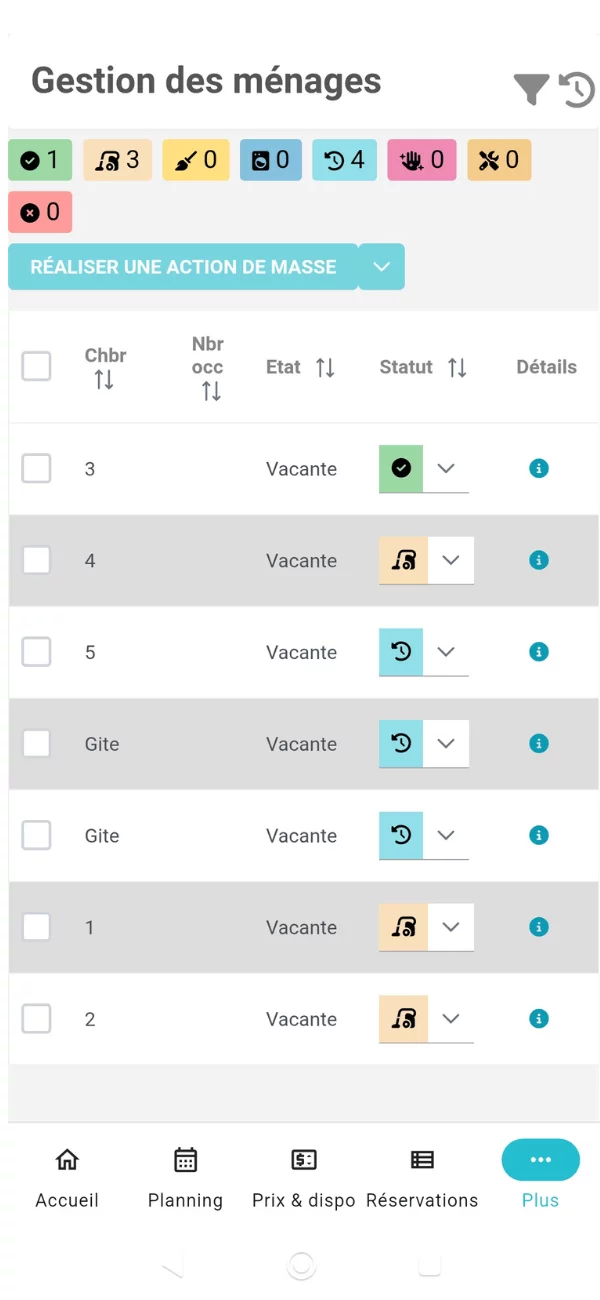
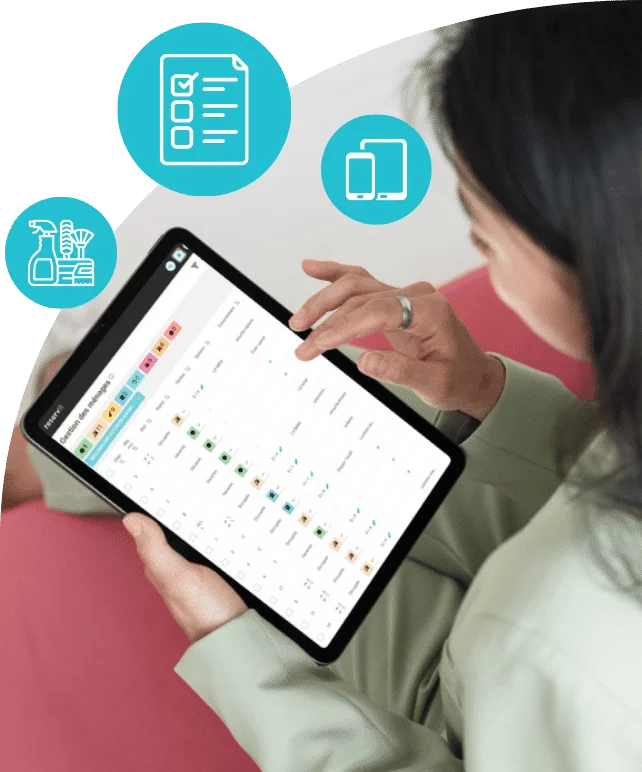
The floor works from a phone.
The housekeeping screen of Reservit Manager, on iOS and Android.
- 1
The counts
How many rooms are in each status, at a glance.
- 2
The bulk action
Several rooms change status in one go.
- 3
The status of each room
The attendant changes it on the way out.
- 4
Offline
In a basement or an outbuilding, updates go out when the signal comes back.


Everyone gets their own login.
As many accounts as you have people, with no per-user fee.
Executive housekeeper
Assigns sections, follows the day, signs off inspections.
Room attendant
Sees today’s rooms, checks off tasks, flags anything wrong.
Front desk
Places an early arrival without chasing the floor.
Permissions are set per user:
- View today’s schedule
- Change a status
- Assign rooms
- Report an issue
- Manage accounts
Built for teams who prefer paper, too.
The day’s assignment sheet prints with the same information and tick boxes.
35,000 properties equipped by Reservit
Let us walk through a typical day at your property.
A demo built around your rooms and the way your floor already works.
What operators ask us most.
How many users can I add?
The number of accounts is not capped and is not billed. Every team member gets their own login, with the permissions their role calls for.
Do attendants need a specific device?
No. A phone, a tablet or a computer will do, through a web browser or the Reservit Manager mobile app. For a team that prefers paper, the day’s assignment sheet prints out.
Does the front desk see right away that a room is ready?
Yes. The status changes as soon as the attendant records it, and the front desk reads the same information at the same time. No end-of-shift report needed to know what can be released.
Can I tailor the task lists to each type of service?
Yes. You write one list per type of service: checkout, stayover, deep inspection, in your own words and to your own standards.
Does the app work without a signal?
Yes. Attendants pull up their rooms and check off tasks offline, in a basement or an outbuilding. The changes travel back to the software as soon as the device is on the network again.
Is housekeeping part of my subscription?
Yes. Housekeeping is included in the Reservit subscription, with unlimited logins and no per-user fee. See pricing.
Where does the list of rooms to service come from?
From the reservations schedule. Today’s checkouts, stayovers and arrivals come straight from it: nobody retypes a room list by hand.
How does the executive housekeeper assign rooms?
The executive housekeeper sets each attendant’s section in one click, then follows the day as it moves and signs off inspections. Each attendant only sees today’s rooms.
What statuses can a room have?
Reservit offers a list of statuses, such as to do, in progress, needs inspection or ready, and each property picks the ones it works with. In the app, a bulk action changes the status of several rooms in one go.
Can an attendant flag damage or something missed?
Yes. A note on the room warns the team, and reporting an issue is one of the permissions you can grant to each role.
Do the guest’s booked requests show up for housekeeping?
Yes. What was booked with the stay shows up on the room: a rollaway bed, a bottle to set out, a welcome basket.
Is there a record of who did what?
Yes. The history stays: who worked on which room, and when.
Can I limit what each team member sees?
Yes. Permissions are set per user: view today’s schedule, change a status, assign rooms, report an issue, manage accounts. Each role sees what it needs, and nothing more.
What does the printed assignment sheet include?
Today’s rooms and cabins with the type of service expected, tick boxes that carry the task list, and room for notes to hand back to the executive housekeeper at the end of the shift.
I run several properties: does it cost more?
No. Managing several properties is included, at no extra cost.
Full housekeeping fact sheet
What it does In short
Reservit is property management software for accommodation businesses, founded in 1999, with a Canadian team based in Montreal. Housekeeping ties the departures schedule, the attendants on the floor and the front desk together: today’s list comes from the reservations, the team checks off its tasks, the front desk sees the room is ready. It is included in the subscription.
How a day runs Four steps, one entry
- Checkout is picked up: rooms to service come straight from the reservations schedule (checkouts, stayovers, arrivals).
- Rooms are assigned: the executive housekeeper sets each section in one click.
- The room is serviced: the attendant works through the task list and checks off as they go.
- The room is ready: the front desk sees the status change without picking up the phone.
Statuses and tracking Every room status
- Statuses: Reservit offers a list of statuses (such as to do, in progress, needs inspection, ready); each property picks the ones it works with.
- Task progress per room, counts by status.
- Bulk action in the app to change several statuses in one go.
- History: who worked on which room, and when.
Task lists The same method in every room
- One list per type of service: checkout, stayover, inspection.
- Your own lists, written in your words and to your standards.
- A note per room to warn the team about damage or something missed.
- What was booked with the stay shows up: rollaway bed, bottle to set out, welcome basket.
- Saturday’s new hire works the way the attendant of eight years does.
Roles and permissions Everyone gets their own login
- Executive housekeeper: assigns sections, follows the day, signs off inspections.
- Room attendant: sees today’s rooms, checks off tasks, flags anything wrong.
- Front desk: checks statuses to place an early arrival without chasing the floor.
- Permissions set per user: view today’s schedule, change a status, assign rooms, report an issue, manage accounts.
- Uncapped accounts, no per-user fee.
Mobile app Reservit Manager, iOS and Android
- Attendants pull up their rooms, check off tasks and change a status from their phone, with their usual Reservit credentials.
- Today’s schedule, exactly as it reads at the desk.
- Offline in a basement or an outbuilding: updates go out when the signal comes back.
- Download: App Store and Google Play. Google Play and the Google Play logo are trademarks of Google LLC. App Store is a service mark of Apple Inc.
Screen-free Printable assignment sheet
- The rooms of the day, with the type of service expected.
- Tick boxes that carry the task list.
- Room for notes to hand back at the end of the shift.
Subscription and pricing How the price is set
- A subscription priced in Canadian dollars, taxes extra, never a percentage of your bookings: the software takes no commission.
- The price depends on the type of property, the number of units and the add-on modules you choose, never on your sales volume.
- Unlimited users: Reservit bills the software, never the user.
- Included: the ten modules of the suite, more than 50 integrations with no usage fees, updates, onboarding, training and support from a team based in Canada, by phone or by email.
- Add-on modules, only if you choose them: online check-in, guest messaging, extras and services, metasearch sites (Trivago, Tripadvisor, KAYAK…), website builder, CRM (guest records and newsletters), online reputation management, pre-arrival guest preparation, guest reviews, local listings management. The direct connection to Google is included; Google Hotel Ads advertising is optional.
- Yearly commitment, monthly or yearly payment; adding or removing units is prorated.
- A written offer, priced for your property; migration of your booking data from your previous software included in the installation price.
- Security: two-factor authentication, access logs, PCI DSS certified payment environment.
Details on the Pricing page.
Related modules The whole software follows
- Reservation management: the schedule that starts the housekeeping day.
- Mobile app: the floor works from a phone.
- Multi-property: included, at no extra cost.
Who it is for Accommodation businesses in Canada
Hotels, motels, chalets and cabins. Reservit was founded in 1999 and works with more than 35,000 properties. Demo and onboarding with the Montreal team.