



Sell at the right rate, every day of the year
Your competitors’ rates tracked every day, your position, and a recommended rate for each date. Included in the subscription.
- 0% software commission
- Canadian team in Montreal
A fixed price loses twice
The same rate grid all year sells too low when demand rises, and too high when it drops.
One week, one rate
- High demand: sold too low
- Low demand: empty units
High-demand nights
Sold out early, at an ordinary night’s rate. Travellers would have paid more.
Slow nights
Your rate stays above the market. Units stay empty.
Revenue management means selling the right unit, at the right price, through the right channel, based on demand, competition and the calendar.
Saturday, March 14 — double room
Compare like with like
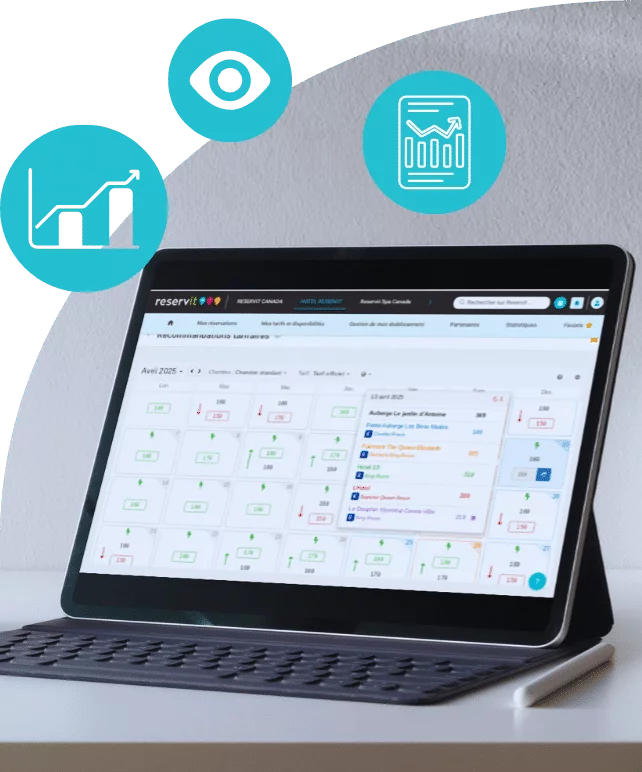
Unit type by unit type, distributor by distributor: your actual position, not a market average.
- Direct competitors, chosen by you.
- Tracked by type of room, chalet or campsite.
- Your position on every distribution channel.
- An alert when a competitor drops below your rate.
Rate tracking
10 competitorstracked every day, across 365 dates.
Public rates, nothing else
The ones your competitors display on online travel agencies and, where possible, on their own website. No private data.
A 365-day view
The whole year, not just the week ahead: the gaps to fill and the dates where you sell too low.
Demand tracked over twelve months
- Demand tracked in your market
- High-demand periods
- High season is prepared months in advance.
- Gaps are spotted while there is still time to act.
- You decide based on real dates, not on a hunch.
How the recommended rate is calculated
Four sets of data go in, one rate comes out. You follow it, change it or ignore it.
- Public rates tracked at your competitors
- Your occupancy on the date
- Seasonality and events in your region
- The quality of your online reviews
From your rate to the traveller
An approved rate is never re-entered anywhere: it goes from your calendar to your channels and your website.
-
1
Recommended rate
The module suggests one, date by date.
-
2
Your decision
You follow it, change it or ignore it.
-
3
Reservit calendar
The rate is entered there, once.
-
4
Your channels and your website
Channel manager and booking engine.

On your website, a price for every night
Your booking engine shows each night’s price right in the calendar.
On the platforms, the same rate
The channel manager sends every adjustment to your connected channels. Nothing to re-enter in the extranets.
- Platforms
- Metasearch sites
- Vacation rentals
- GDS
- Travel agencies
What 6% more would mean
Three figures are enough to estimate your annual revenue and see what a 6% gain would represent.
Fill in all three fields, with an occupancy rate between 1 and 100.
| Estimated current RevPAR | — |
|---|---|
| Estimated current annual revenue | — |
| Annual revenue in the 6% scenario | — |
- RevPAR:
- revenue per available unit, i.e., the average rate multiplied by the occupancy rate.
- Annual revenue:
- RevPAR multiplied by the number of units and by 365 days.
The 6% scenario is a working assumption, not a guaranteed outcome. Results vary by property, market and season.
Connected revenue management tools
Our module, or yours
Reservit develops its own Revenue Management System. If you already manage your rates with another tool, it may be among those connected to the software.




Take back control of your rates
Thirty minutes is all it takes to see the module at work in your market, with your competitors.
Request a demoFrequently asked questions
What is revenue management?
It means selling the right unit, at the right price, through the right channel. In practice: adjusting your rates to demand, competition and the calendar, rather than applying a fixed rate grid all year.
How does Reservit get my competitors’ rates?
The module tracks publicly displayed rates. The ones your competitors publish on the main online travel agencies and, where possible, on their own website. No private data is used.
Does the module change my prices without my approval?
No. The module tracks rates, alerts you and recommends a rate. You follow it, change it or ignore it: the final decision is always yours.
Does the module remove platform commissions?
No. Reservit takes no commission on bookings processed by the software, but online travel agency commissions are still owed. The gain comes from a better rate and a larger share of direct bookings.
Is the 6% gain guaranteed?
No. It is a working assumption, used in the calculator to show what such a gain would represent. The actual result depends on your market, your seasonality and how carefully the module is set up.
Do I need to be a pricing expert to use it?
No. The module is built into your Reservit software, right next to the calendar: one table, colour codes, your competitors side by side with you. The Montreal team helps you get started.
Can I keep the RMS I already use?
Yes. Reservit develops its own module, and several revenue management tools are connected to the software. If yours is one of them, it keeps managing your rates and Reservit receives the updates.
How many competitors can I track, and over what period?
Up to ten direct competitors, chosen by you. Rates are tracked every day, across 365 dates, unit type by unit type (room, chalet or campsite) and distributor by distributor: you see your actual position, not a market average.
What is the recommended rate based on?
Four sets of data: the public rates tracked at your competitors, your occupancy rate on the date, seasonality and events in your region, and the quality of your online reviews. You follow the suggested rate, change it or ignore it: the final decision is always yours.
Do the new rates go out to my sales channels?
Yes. Each adjustment is entered in your Reservit calendar, then the channel manager sends it to your channels: nothing to re-enter in each extranet. On your website, the booking engine shows each night’s price right in the calendar.
Is the module included in my subscription?
Yes. The Revenue Management System is one of the ten modules of the Reservit suite, all included in the subscription. The module is developed by Reservit: no third-party tool to connect or pay for. See Pricing.
How is it different from Reservit’s statistics?
The statistics report what has happened: their forecasts project what is already booked. Acting on rates and availability is the job of revenue management.
Which properties is the module designed for?
Hotels, motels, campgrounds, inns, B&Bs, chalets and cabins, and outfitters: rates are tracked by type of room, chalet or campsite. More than 1,000 properties in Quebec already work with Reservit. Thirty minutes is all it takes to see the module at work in your market, with your competitors.
Revenue Management System: full fact sheet
Competitor rate tracking Your competitors, date by date
- Up to ten direct competitors, chosen by you.
- Daily tracking of the public rates displayed on the main online travel agencies and, where possible, on competitors’ websites. No private data.
- Comparison by unit type: room, chalet or campsite.
- Your position visible on every distribution channel.
- An alert when a tracked competitor drops below your rate.
365-day view The whole year, not just the week ahead
- Rates tracked across 365 dates.
- High-demand periods and gaps spotted while there is still time to act.
- High season prepared several months in advance.
The recommended rate Four sets of data, one rate
- Public rates tracked at your competitors.
- Your occupancy rate on the date.
- Seasonality and events in your region.
- The quality of your online reviews.
You follow the recommended rate, change it or ignore it.
Rate distribution From the calendar to your channels
- Each adjustment is entered in the Reservit calendar.
- The channel manager sends it to the connected channels, with nothing to re-enter in the extranets.
- The booking engine shows each night’s price right in the calendar.
Before and after What daily tracking changes
- Tracking competitor rates: without an RMS module, tabs opened one by one, on a few dates, when time allows; with the module, up to ten competitors tracked every day, across 365 dates.
- Decision horizon: without the module, the next two weeks; with it, the whole year, season by season.
- Adjusting a rate: without the module, by hand, when someone thinks of it; with it, a recommended rate for each date, which you approve.
- A competitor drops its rate on a Sunday evening: without the module, spotted on Monday, fixed on Tuesday; with it, flagged at the next tracking run.
- Updating the sales channels: without the module, re-entered in each extranet; with it, entered in the Reservit calendar and sent by the channel manager.
The calculator How to read the estimate
- RevPAR: revenue per available unit, the average rate multiplied by the occupancy rate.
- Annual revenue: RevPAR multiplied by the number of units and by 365 days.
- 6% scenario: a working assumption, not a guaranteed outcome.
What the module does not do To be clear
- It does not remove online travel agency commissions, which are still owed.
- It does not change any price without your approval.
- It does not guarantee a result: that depends on the market, the season and the setup.
Integrations Our module, or yours
Reservit develops its own revenue management module, the Revenue Management System. Several revenue management tools are also connected to the software: if yours is one of them, it keeps managing your rates and Reservit receives the updates.
Getting started With the Montreal team
- The Revenue Management System is one of the ten modules of the suite, included in the subscription.
- The module is built into the Reservit software, next to the calendar.
- The Montreal team helps you get started with the module.
- A thirty-minute demo in your market, with your competitors.
Key figures In short
- Up to 10 competitors tracked.
- 365 dates tracked every day.
- 4 sets of data behind the recommended rate.
- 0% software commission.
- More than 1,000 properties in Quebec use Reservit.
Subscription and pricing How the price is set
- A subscription priced in Canadian dollars, taxes extra, never a percentage of your bookings: the software takes no commission.
- The price depends on the type of property, the number of units and the add-on modules you choose, never on your sales volume.
- Unlimited users: Reservit bills the software, never the user.
- Included: the ten modules of the suite, more than 50 integrations with no usage fees, updates, onboarding, training and support from a team based in Canada, by phone or by email.
- Add-on modules, only if you choose them: online check-in, guest messaging, extras and services, metasearch sites (Trivago, Tripadvisor, KAYAK…), website builder, CRM (guest records and newsletters), online reputation management, pre-arrival guest preparation, guest reviews, local listings management. The direct connection to Google is included; Google Hotel Ads advertising is optional.
- Yearly commitment, monthly or yearly payment; adding or removing units is prorated.
- A written offer, priced for your property; migration of your booking data from your previous software included in the installation price.
- Security: two-factor authentication, access logs, PCI DSS certified payment environment.
Details on the Pricing page.
Related modules Going further
- Channel manager: your rates distributed to all your channels.
- Booking engine: each night’s price on your website, commission-free.
- Offers manager: packages, promotions and codes.
- Statistics and reports: what is booked, what is forecast.
- Property management system (PMS): the calendar where your rates are entered.
- Pricing: what the subscription includes.