
Reservation management
Run the day from one calendar.
Reservit is management software for tourist accommodation. Its calendar brings stays, changes, payments and invoices together in one place.

The calendar
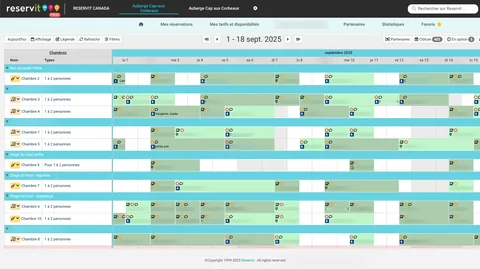
A whole week at one glance
Units run down the rows, days across the columns. Nothing needs opening to see who arrives tomorrow.
Day, week or month
Zoom in on a busy day, or step back over a full season.
Drag and drop
Move a stay to another unit, or shift its dates.
Colour coding
Direct booking, platform or blocked unit: the source reads without opening the record.
Four steps
Change a stay without starting over
Pick a stay in the calendar, then follow the four steps. Rate, balance and availability all follow.
Select
One click on the stay in the calendar opens its record.
Edit
Change the dates or the unit: the rate recalculates.
Settle the payment
Has the balance moved? Take the difference, or issue the refund.
Save
Availability goes back out to your sales channels.
Groups and allotments
A group behaves like one stay
Block several units at once, adjust the whole group or a single unit, and decide who pays for what.
Flexible unit blocks
Book twelve units in one go, then adjust just one of them.
Bulk changes
A rate, an option or a meal applies to the entire block.
Master invoice
One invoice for the group, or separate payments per unit.
Conference group
12 units, 3 nights
- Unit 101Master invoice
- Unit 102Master invoice
- Unit 103Separate payment
- 9 more unitsMaster invoice
Invoicing
Invoices start in the calendar
No detour through an accounting menu: the stay record carries the invoice, the payment and the email.
Invoice from the record
Produce the document from the stay, without changing screen.
Send by email
The PDF goes to the guest from the window you are already in.
Configured taxes
Taxes are calculated at the rates set for your property.
What actually changes
Five ordinary tasks, before and after.
| Task | With separate tools | With Reservit |
|---|---|---|
| Shift a stay by one night | Fix the spreadsheet, then each platform one by one | The stay moves, availability goes back out |
| Collect a balance | Come back to the file later, when it comes to mind | The balance settles in the same window |
| Invoice a group | One invoice per unit, added up by hand | Master invoice, or separate payments |
| Know who arrives tomorrow | Cross two lists and an inbox | The day reads on a single row |
| Prepare housekeeping | A sheet printed the evening before | Arrivals and departures come from the same calendar |
Frequently asked questions
What people ask before changing calendars.