Every operation on one screen
Reservit PMS brings the planner, arrivals, payments, invoicing and teams together in a single interface, opened from any browser.

A PMS your teams actually use
Five decisions you notice in the first week.
It reads at a glance
The planner, the statuses and a stay’s record sit on one screen. Everyday actions take two clicks, not six.
100% cloud
Nothing to install, nothing to back up at night. The PMS opens in a browser, from the front desk, the floors or your home.
It handles the repetitive work
Confirmations, reminders, payment capture and accounting entries fire on their own. Less typing, fewer things forgotten.
A team that knows the trade
The same people follow your property, from setup through to the everyday questions.
Support is included
Phone and email, at no extra cost and with no cap on user accounts. It is a line you never see appear on the invoice.
Satisfaction measured on requests handled by support: 97%.
The planner, at the centre
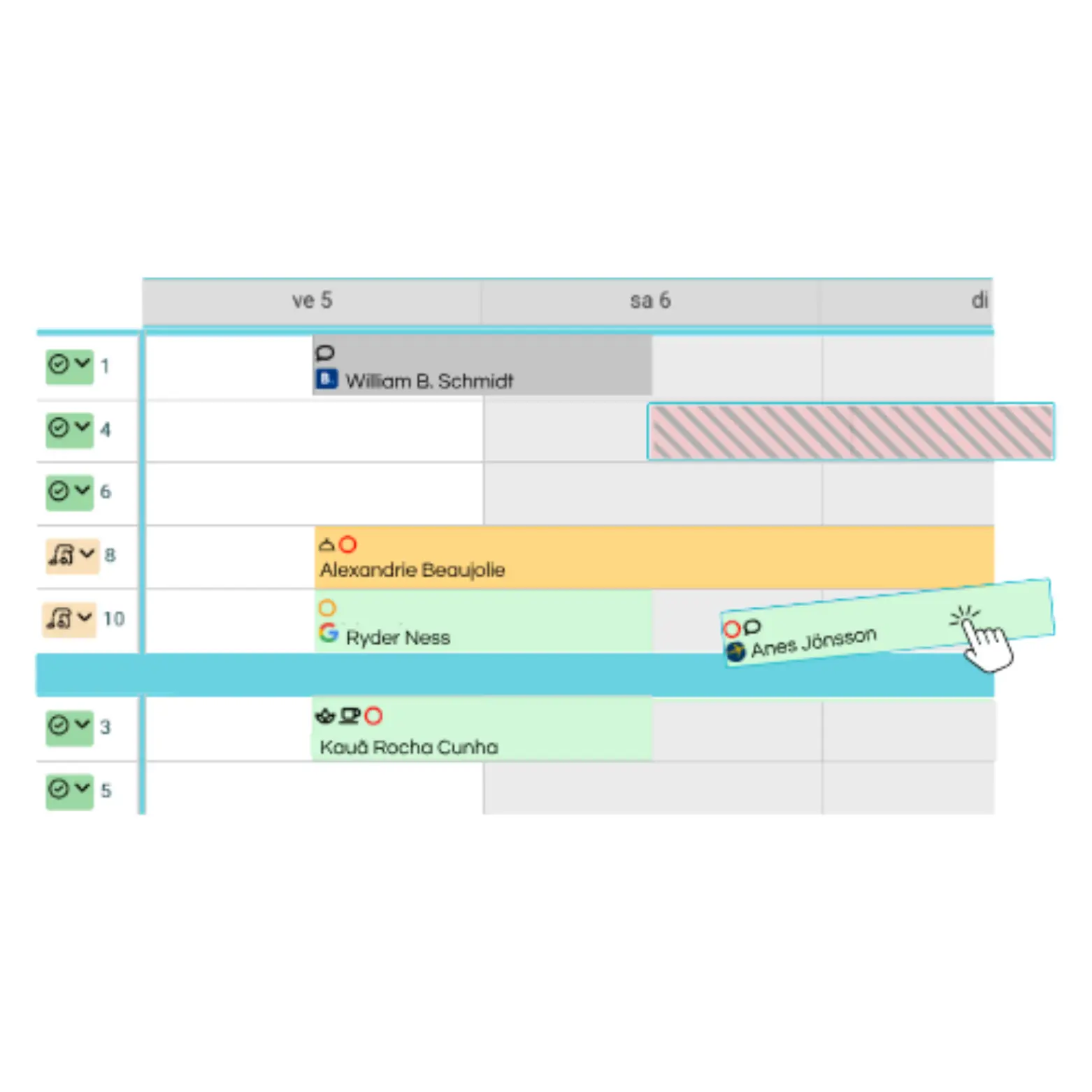
Every unit and every stay on one screen. A stay moves, extends, opens. Groups and allotments live there too, without switching to a second tool.
Colour carries the status
Confirmed, awaiting guarantee, checked in, checked out: the colour says it before you read.Groups don’t break the view
A multiple booking stays readable, unit by unit, without leaving the planner.The record opens from the stay
Contact details, services, payments and documents, all in one place.
Everything the PMS takes on
Eight areas, one database. What is entered once is never entered again.
Arrivals and departures
The guest fills in their details before arriving and opens the room from their phone. Your locks stay where they are: access runs through an access-management partner, and Reservit sells neither kiosk nor hardware. Walk-in guests are taken on the same screen.Payments
In-person or virtual terminal, payment link, capture from the mobile app. Deposits, OTA virtual cards and instalments are automated. Reservit is PCI-DSS Level 1 certified.Invoicing
Compliant invoices, tax calculated on each service, account statements and deposit tracking. Entries export to your accounting software.Extras and services
Breakfast, parking, spa access, packages: additional services sell before arrival as well as at the desk, and invoice themselves.Average effect measured on revenue per stay: +13%.
Teams and housekeeping
Roles and access rights by job, unit statuses kept by the teams themselves, printable task sheets for the day.Reporting
Production, occupancy, average rate, revenue per available unit, split by channel. Views are built and filtered by period, unit type or source.Sales channels
Availability and rates leave from the same planner, and bookings come back into the PMS with nothing retyped.Multi-property
Several addresses under one login: switch between properties without signing out, consolidate reporting, apply one rate policy.The same tool, on mobile
Reservit Manager opens your PMS from a phone. Taking a booking during a call, closing a date, adjusting a rate or changing a unit’s status: the planner’s actions happen where you are.


Included in your subscription, with no cap on users.
Discover the mobile appThe till, connected
Reservit POS rings up the bar, the restaurant and the shop. The server posts the bill to an occupied room, the guest settles on departure, and the meal appears on the stay invoice.
Straight away
Course 1
Tap an item to open a bill
Left to pay€47.50
Post to the room account
Take payment
Bill posted to room 204.
Demonstration screen. The items, rates and amounts come from no client property.
Discover Reservit POSSwitch PMS, seamlessly
It is the IT project properties put off the longest. It is handled end to end.
Your data comes across
Guest and company records, upcoming bookings and payments already captured are brought over from your current system.
Setup is done for you
Units, rates, taxes, terms of sale and channel connections are built by the team, not by you.
Training for your teams
Sessions shaped for each job: front desk, housekeeping, management. The switchover date is agreed with you.
An open help centre
Video tutorials, step-by-step guides and frequently asked questions, available at any time once you are live.
The Reservit help centre
All the PMS documentation, kept current, open to your teams.
Frequently asked questions
Does Reservit PMS work with my channel manager?
Yes. The PMS connects natively to the Reservit channel manager and its partner platforms: availability and rates leave from the planner, bookings come back to it. If you use a third-party channel manager (often the case for properties affiliated to a chain), the connection goes through our programming interfaces and is reviewed with the team before you commit.
Is my data safe?
Yes. Reservit is PCI-DSS Level 1 certified, the highest level of the standard that applies to payment data. Data is hosted on dedicated servers and backed up daily: a dead front-desk computer no longer costs you anything.
How long does migration take?
It depends on your scope. The volume of data to bring across, the number of units and the connections to rebuild all move the schedule. It is agreed with you before the switch, and the team handles the transfer and the setup.
Can I manage several properties from one login?
Yes. The Multi-property module lets you move between addresses without signing out, consolidate reporting and apply a common rate policy. There is no technical limit on the number of properties.
Is support included in the subscription?
Yes. Phone and email support is included, at no extra cost and with no cap on user accounts. The online help centre stays available at any time.
Do I need to install software on the computers?
No. Reservit PMS opens in a browser: no machine to prepare, no update to run, no local backup to watch. The mobile app extends that access to a phone.
See it at work
A demo run by an advisor, on your real scope: your units, your rates, your channels.